Crafting the Future of News on Disney+
Sep 1, 2023
Disney
I had the exciting opportunity take part in an ambitious project aimed at seamlessly integrating ABC News content into Disney+. Our mission? Boost engagement, reduce churn, and bring the magic of Disney to news consumption.
Team & Background:
An ambitious 3-day sprint that ultimately translated into a 4-month vision project that has now become productized! Woo!
My role: Product Designer
Team 2 design strategy & ops
6 designers
6 PMs + design
Product leadership
Duration 1 month (within a 4 month roadmap 📍)


The Problem Space 📰
In today’s digital landscape, news consumption is highly fragmented. Users often rely on multiple platforms to stay informed, which leads to a disjointed and sometimes overwhelming experience. Integrating ABC News into Disney+ posed a unique challenge: maintaining the strong reputation and trust that ABC News has built over the years without diluting the Disney brand. Additionally, understanding when and how users prefer to consume news is crucial for driving engagement.
Our Solution 💡
Our approach was centered on user behavior and preferences, aiming to create a tailored news experience. Integrated branding was a key strategy, ensuring that ABC News content was prominently highlighted within Disney+ while maintaining its trusted reputation. Dynamic content delivery was another critical aspect, providing a mix of live and on-demand news content to suit different user habits.
01 BACKGROUND & RESEARCH 🌟 🔍 🌟 🔍 🌟 🔍🌟 🔍
Before diving into design, we did our homework 🤓
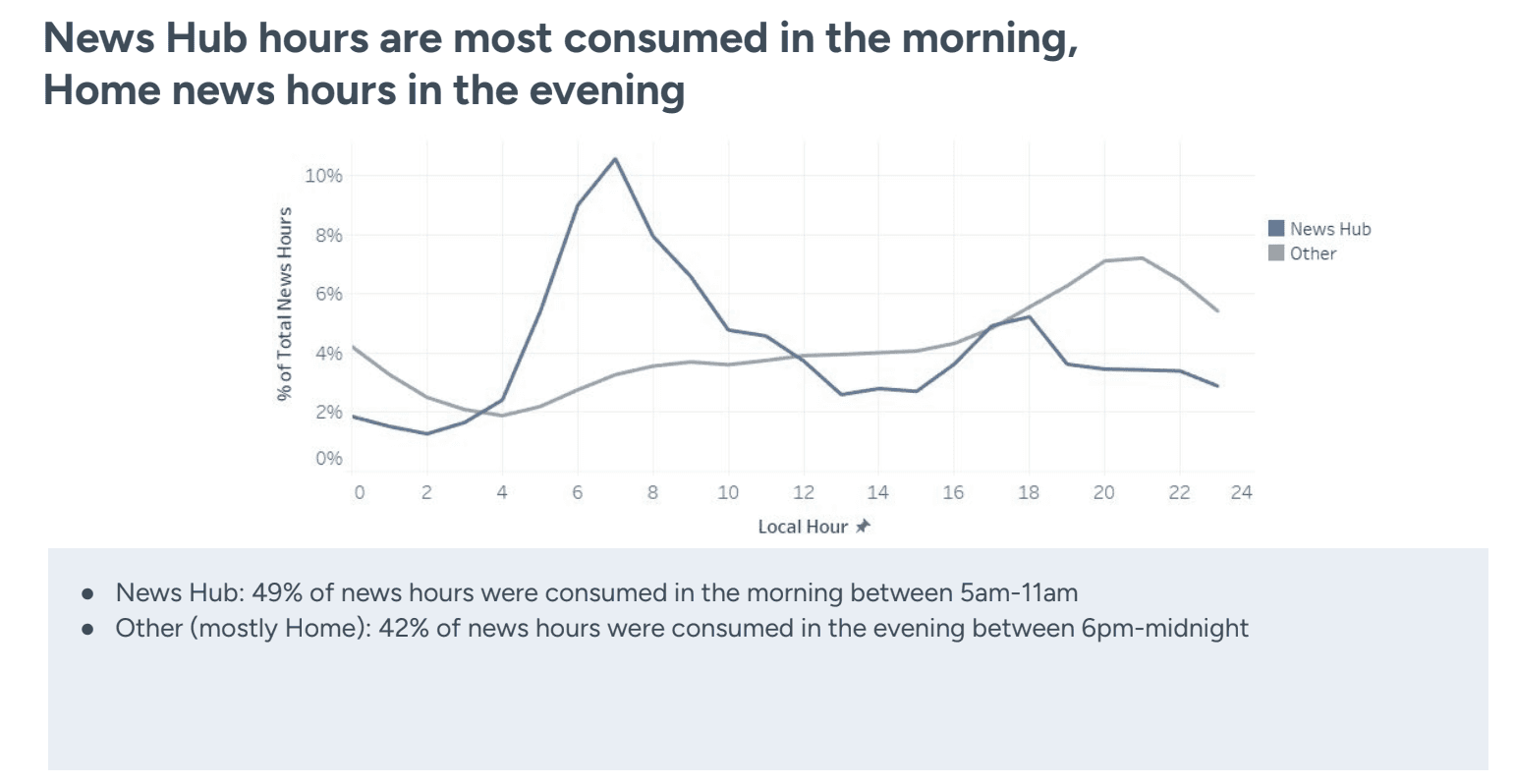
We took a close look at Hulu’s News Hub, which launched in February 2022, to understand user behavior and preferences.
News Consumption: A significant portion (91%) of news hours comes from the Home screen.
Impact of News Hub: Live and upcoming news segments dominate, driving 57% of news hours
😌 Simplifying News Discovery
Increasing awareness about news content, especially live and local news, can help shift how users see Disney+. Introducing more curated and personalized news collections will make it easier for users to find what they’re interested in without feeling bombarded.
👀 Personalized News Preferences
Users have varied news preferences. By tapping into data signals, we can personalize both marketing and product features to make news content more appealing. For example, users who love documentaries, sports, and international news are more likely to engage with news content.
💪 Leveraging Disney+ Strengths
Users come for movies, family-friendly shows, nostalgia, and cartoons. By understanding these mental models, we can design a news experience that feels natural and engaging. On the flip side, Hulu is seen as a general streaming service with a mix of content, including live shows and news.
User segmentation revealed that those interested in documentaries, sports, and international content are more likely to watch news.
_______________
Ideation Phase
With our research in hand, the team of designers from the Disney Streaming team and ABC News team rolled up our sleeves and brainstormed a ton of ideas. The goal was to think big and bold, pushing the boundaries of how news could be presented, discovered, and consumed on Disney+

⏰ Objective
Generate diverse ideas for presenting, discovering, interacting with, and consuming news content.
📈 Methodology
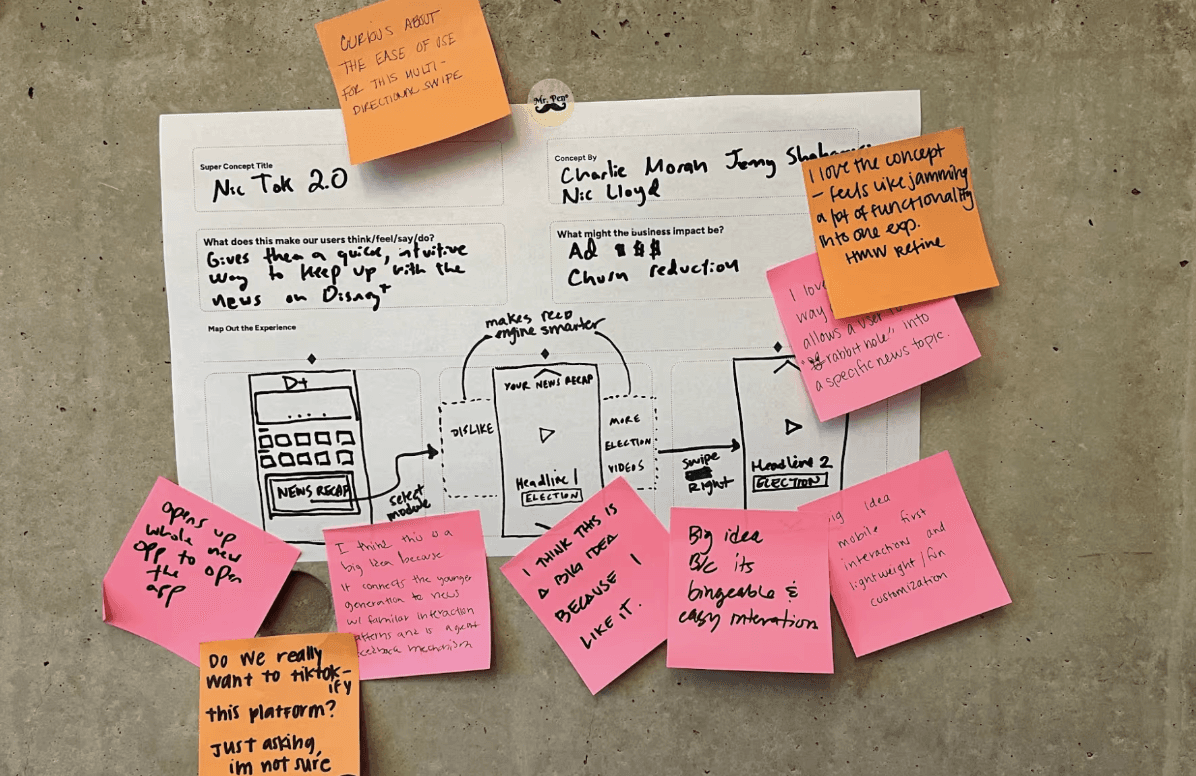
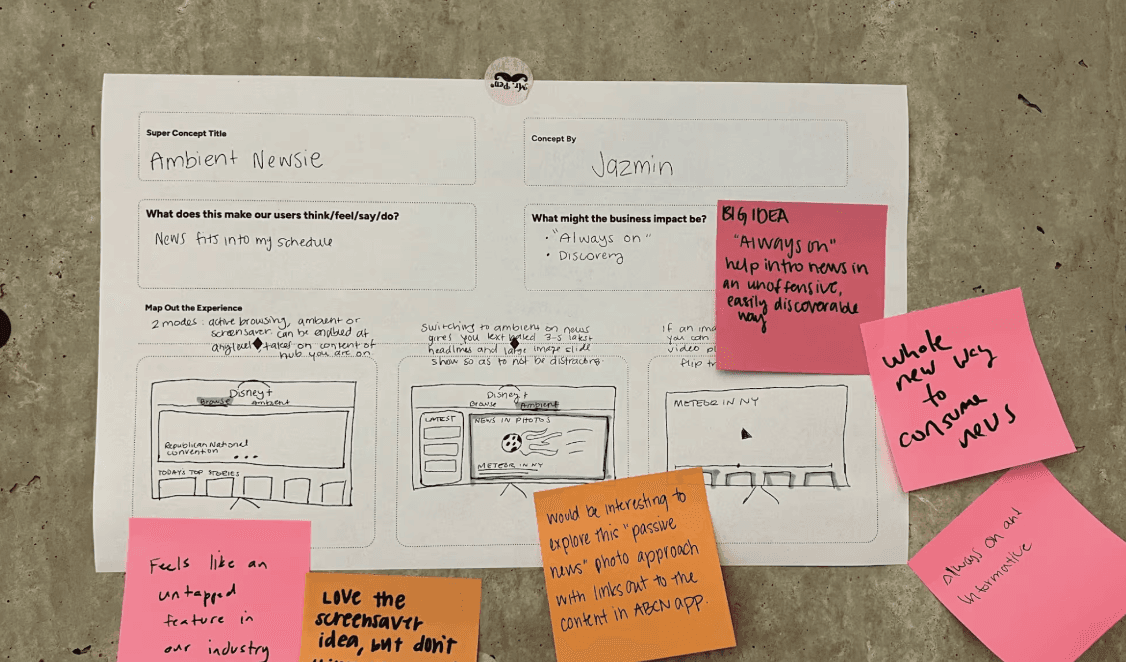
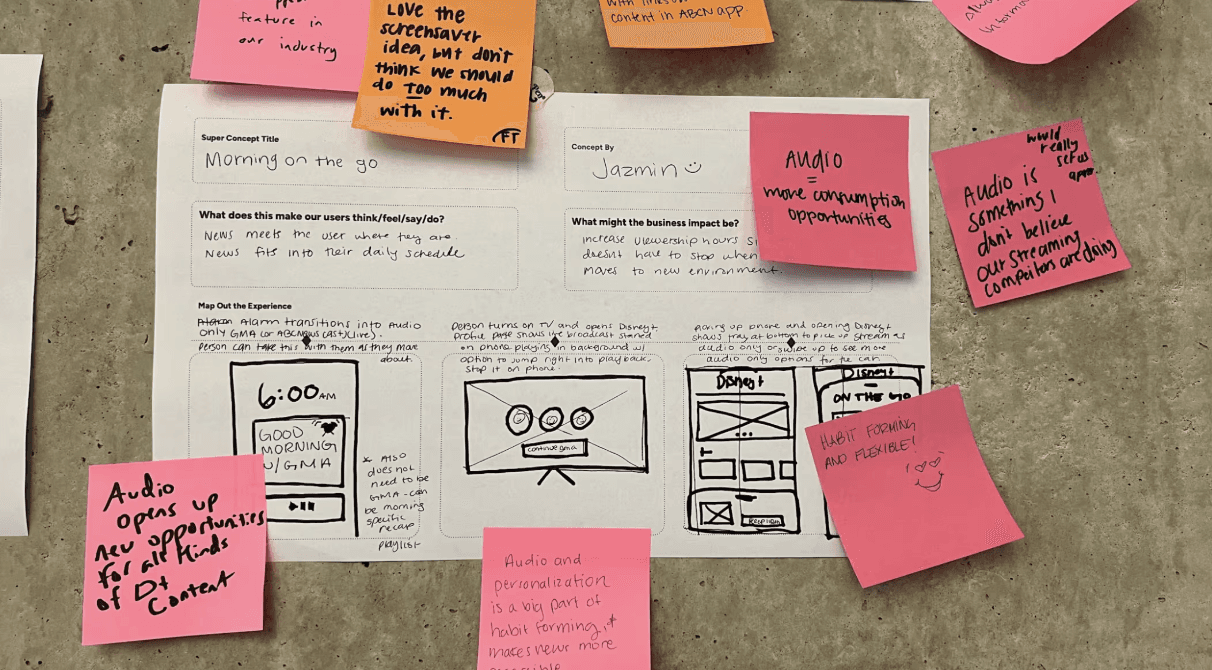
Collaborative workshops, sticky notes for content mapping, crazy sixes (for the sake of time of course), sketching sessions, and FIGMA.
Outcomes
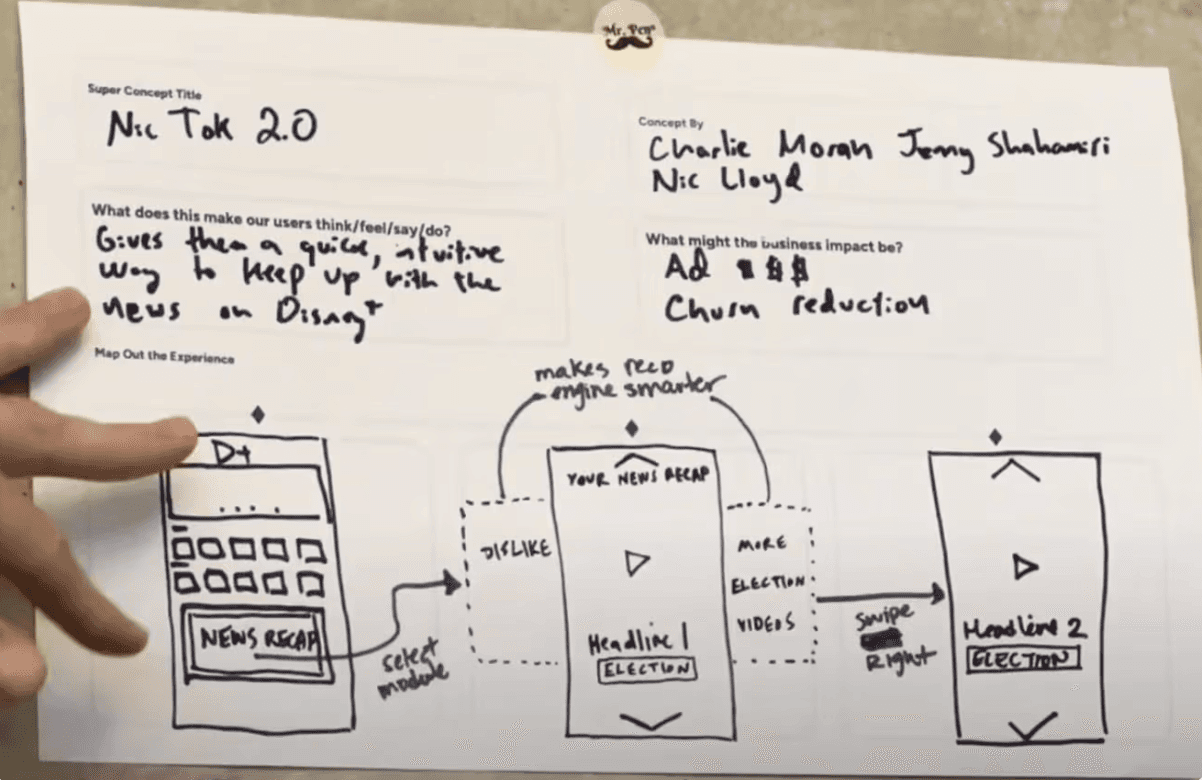
Over 50 initial ideas, categorized into immersive experiences, interactive features, and seamless integration.
Affinity Mapping
Affinity mapping was essential in defining the strategy for integrating news content into Disney+
Goal 1: Define Content Themes and Approach
Establish key themes for presenting news content and develop a strategy for each theme.
Goal 2: Establish Supplemental Tenets
Develop additional guiding principles to enhance the news experience on Disney+.
Goal 3: Core User Needs and Develop Proto Personas
Understand the primary needs of Disney+ users regarding news content and create proto-personas to guide design decisions.
_______________
03 HIGH FIDELITY PROTOTYPING 🪩 💃🏻 🪩 💃🏻 🪩 💃🏻 🪩 💃🏻 🪩
Concept Development
Next, we refined these ideas into what we called 3-Frame Superconcepts . This approach helped us think beyond one-off features and consider how they could scale and connect with other ideas. Cool themes that came out of Superconcept Explorations: Immersive Home: A dynamic home screen with live updates and personalized news highlights. Brand Row: Dedicated rows for ABC News content, maintaining brand trust. Mobile First Content : Introducing short form content from news reels and original content News Hub & Hub Page: Centralized news hub with intuitive navigation and deep dive options. Connection Points: Seamless links from Disney+ to ABC News for comprehensive coverage.
Iterations of Displaying Breaking News
Subtle Yet Noticeable
Small Red Badge: A discreet red badge will appear on the home page carousel, specifically on a small banner introducing the concept of short-form news content and the 'Explore Feed.' Highlighting Urgency: The badge serves to subtly alert users about breaking news without being intrusive.
Balancing Urgency and User Experience
Non-Intrusive Alerts: Instead of interruptive pop-ups or banners, the red badge quietly signals the presence of urgent news. Contextual Relevance: The badge will only appear if the news is relevant and significant, ensuring users aren't overwhelmed with constant notifications.
Initial Notification
When breaking news occurs , the red badge appears on a specific tile in the home page carousel. Users engaged in watching content won't be interrupted; they’ll notice the badge only as they browse the home page.
Introducing news through an explore feed
Intentional News Delivery
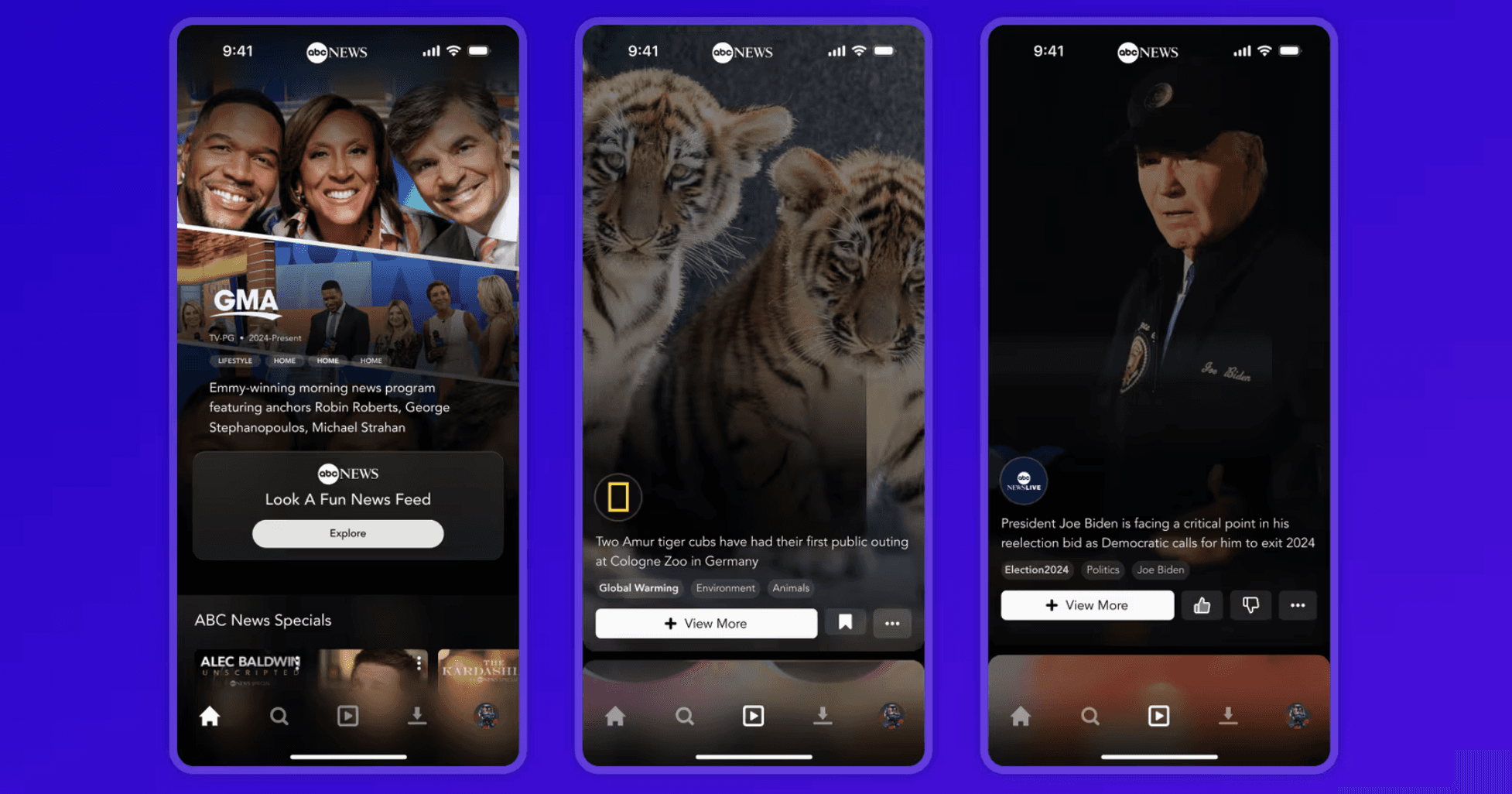
Alright, let’s be real. Nobody wants to get spammed with news while they're trying to chill and watch their favorite shows. So, we're keeping it cool by highlighting big events on the Disney+ homescreen, but we’re not throwing headlines in users' faces. If users want the full scoop, they can head over to the ABC News Hub whenever they feel like it. This way, users call the shots and their binge-watching remains blissfully uninterrupted.
Reusable Concepts and Explore Feed
We’re not here to reinvent the wheel—just make it spin smoother. The Explore Feed is our new gig on the homepage carousel, which users already use to discover new movies and shows. It's all about keeping things familiar and easy. The Explore Feed will dish out curated news clips with handy tags so users can dive deeper into topics they care about. The tagging system will be all over Disney+, making it a breeze for users to find what interests them.
Showcasing ABCN and Related Brands
We’re jazzing up the brand tiles section to make it more exciting. Users will see tiles for Marvel, Star Wars, and ABC News, showcasing a variety of shows and encouraging exploration. When users click on a tile, they’ll be taken to the ABC News Hub, where they’ll find a similar carousel setup. This means users can easily switch from entertainment to news and discover even more cool stuff without any hassle.
Encouraging user exploration & agency
Entering the ABC News Hub
To get started, users navigate to the ABC News Hub on Disney+. Here, users are introduced to the explore feed through a carousel header with the CTA. This is to prevent the News experience becoming too jarring, and give users the agency to choose if they want to dive deeper into News through the explore page.
Discovering the Explore Page
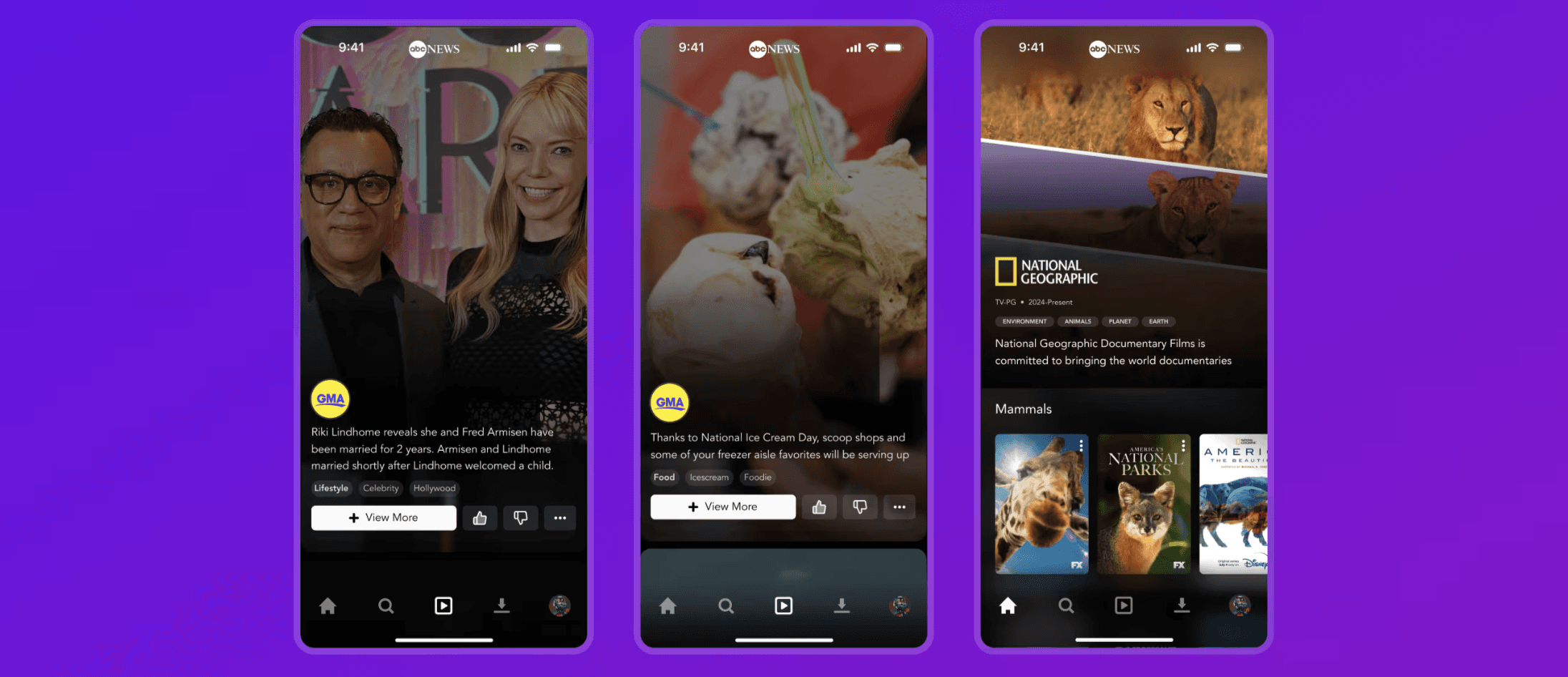
The Explore page is the gateway to short-form news content, featuring clips from ABCN, National Geographic, Good Morning America, Nightline, Localish, and more. By liking or disliking clips, bookmarking their favorites, and using tags, users will be recommended more relevant content.
Personalizing Your Experience
To personalize the news feed, use the three-dot menu to select the categories allows users to select preferred categories, thus giving users more agency over the types of content they'll consume. Our goal was to make sure that we're providing age appropriate and non-triggering content, and giving users the ability to control their settings.
Encouraging Users to Dive Deeper 🕳️🐰
Exploring Related Clips:
When watching a video, such as news on new cute animals at the zoo from National Geographic, users can dive deeper into related content: Feed of Related Clips 🎥: Presented with a stream of all clips from the same zoo based on the tag. Tag-Based Exploration 🗺️: Click on specific tags like environmentalism, mammals, etc., to see more content in those categories.
Viewing More Content:
Main CTA: Clicking "View More" leads users to the specific article the video references, additional articles on the same topic, or more related videos. Article and Video Integration: Ensures users can access comprehensive information seamlessly.
Brand Profiles and Navigation
Each video includes a profile picture for brand recognition: Brand Recognition: Profiles for brands like National Geographic, ABC News, and more. Easy Navigation: Allows users to navigate to Disney+ to watch related documentaries or episodes from Good Morning America (GMA) and specific news segments.
_______________
Lessons Learned
Moving So Damn But Also Enjoying the Flow
This project was a whirlwind . We moved at lightning speed, and there were definitely moments when I wished for more time to refine every little detail. Though this was a very kind reminder that sometimes, good enough can be just as impactful as perfect (and sometimes way more meaningful!) 💕
Presenting to VPs and Execs: Taking Notes from the Pros
One of the biggest learning curves was presenting our ideas to VPs and execs. Even at this level, I am baffled and in awe at how designers are able to articulate so beautifully (chef's kiss). Key takeaways? Keep it concise, tell a compelling story, and always be prepared for questions 🤩
Coffee, Staying Caffeinated, and Keeping Energy Up
Ah, coffee—the lifeblood of designers everywhere. Staying caffeinated was crucial and keeping energy levels up means taking care of yourself. Seriously, folks, make sure to eat solid meals; burnout happens faster than you think ☕️ Shoutout to Eleanor for the motivation and the coffee breaks 💛
04 REFLECTION
🌼 ☕️ 🌼 ☕️ 🌼 ☕️ 🌼
05 NEXT STEPS WOOO
🌼 ☕️ 🌼 ☕️ 🌼 ☕️ 🌼
let's go party people!!!!
Further iterations & sprint planning
The explore feed and mobile first garnered a lot of interest from our senior leadership along with our other exciting plans, so we're approved to do more designing! (yay!)